

Manager Dashboard
The Manager Dashboard is your command center in MobilOS. It offers a quick overview of key metrics and recent activities of your operation, allowing you to make informed decisions and track your team's progress.
Overview and KPIs (Key Performance Indicators)
When accessing the dashboard, you will find a set of cards that highlight crucial information about your Work Orders (WOs):
Shows the total number of Work Orders that are with 'Pending' or 'Scheduled' status, awaiting execution.
Action: Click 'View List' to be directed to the WO screen, already filtered by these statuses.
Indicates how many WOs are currently being executed by your technicians ('In Progress' status).
Action: 'View List' leads to WOs with this specific status.
Presents the total number of WOs that were marked as 'Completed' on the current day.
This is a good indicator of the team's daily productivity.
Shows the number of active WOs (Pending or Scheduled) that have not yet been assigned to any technician.
Action: Click 'Assign Technicians' to go to the WO list filtered by WOs without assignment, facilitating management.

Recent Activities
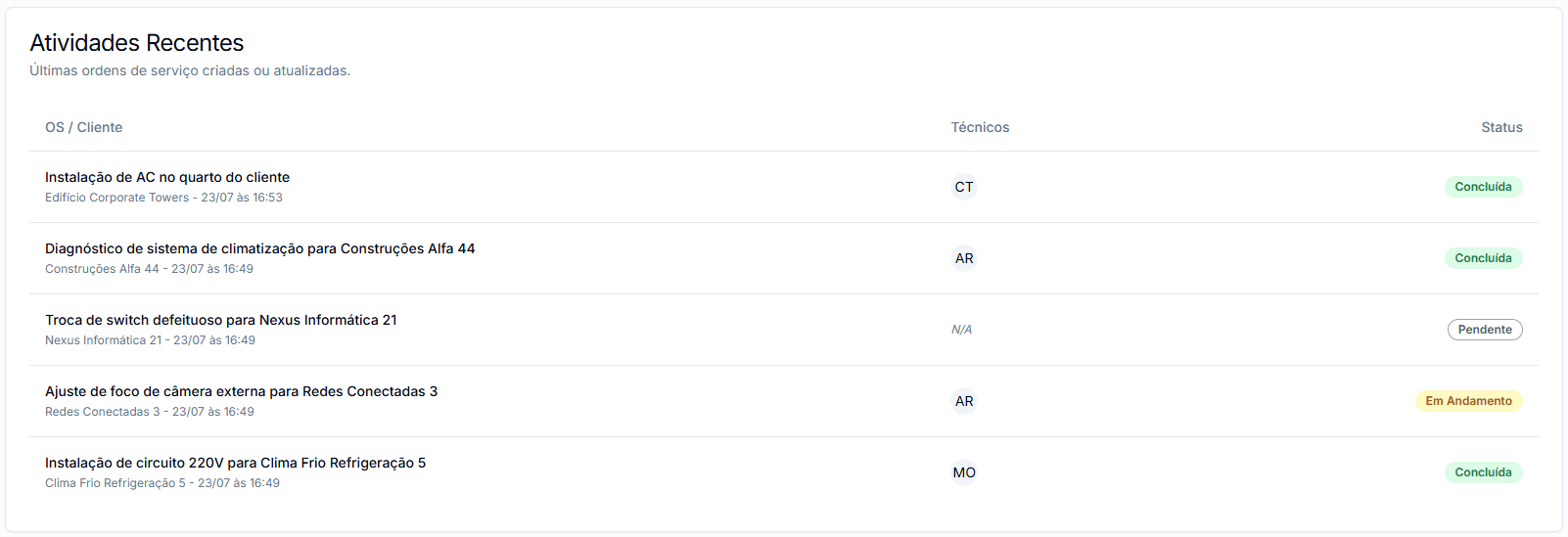
Below the KPIs, you will find a 'Recent Activities' section. This area lists the latest Work Orders that have been created or had their status updated.
- Each item shows the WO title, associated client, assigned technicians (if any), and the date/time of the last update.
- The current WO status is highlighted with a colored badge for easy identification.
- Clicking on a WO title in this list leads directly to the details page of that WO.
Stay Updated
The Recent Activities section is a great way to track workflow and quickly identify WOs that require your attention or have been recently modified.
Quick Actions
The Dashboard also offers buttons for quick and common actions:
- Refresh Data: Refreshes all KPIs and the list of recent activities.
- DocsManagerDashboard.quickActions.item2
Use the Manager Dashboard as your daily starting point to efficiently monitor and manage your field team's operations.